In this chapter we’ll look at how to efficiently process Zarr arrays. We’ll do it with a focus on scalability. Although the examples here below operate on small arrays, the theory and techniques described will scale to processing large datasets and machines with more resources (e.g., number of processing cores).
When we process an array, we are transforming it in some way and creating a new array - think of this as a mapping from one array to another. Because a Zarr array is split into chunks, we can split up this mapping into many smaller jobs. When writing a Zarr array whole chunks are compressed and written in one go, so it makes sense to break down the task into a mapping from the input array to each individual output chunk, and then create one job for each output chunk. This will allow us to compute each output chunk independently, which has two large benefits:
For each job we only need to load the data into memory needed to compute a single output chunk
We can parallelise the computation of output chunks, speeding up the whole process.
To start with lets look at the simplest possible mapping from input chunks to output chunks - where the output array has the same shape and chunk size as the input array, and each output chunk depends only on the corresponding input chunk.
Simple operations
In the context of this chapter, simple operations are those where there’s an exact one-to-one mapping from input chunks to output chunks.
This makes parallelising very simple - we can write a function that takes one chunk (an array), and returns another chunk (another array) that has the same shape.
Before we get into this we’ll setup a few helper functions. First, a function that generates the array indices of every chunk in a Zarr array:
import itertools
from typing import Generator

import zarr


def all_chunk_indices(array: zarr.Array) -> Generator[tuple[slice, ...], None, None]:
    """
    Generate indices that represent all chunks in a Zarr Array.
    """
    ndim = len(array.shape)
    indices = [range(0, array.shape[i], array.chunks[i]) for i in range(ndim)]
    chunk_corners = itertools.product(*indices)
    yield from (
        tuple(
            slice(corner[i], min(corner[i] + array.chunks[i], array.shape[i]))
            for i in range(ndim)
        )
        for corner in chunk_corners
    )
from data_helpers import load_heart_data
heart_image = load_heart_data(array_type='zarr')
print(f"Array shape: {heart_image.shape}")
print(f"Chunk shape: {heart_image.chunks}")
print("Chunk indices:")
for slc in all_chunk_indices(heart_image):
print(slc)Array shape: (120, 120, 139)
Chunk shape: (64, 64, 64)
Chunk indices:
(slice(0, 64, None), slice(0, 64, None), slice(0, 64, None))
(slice(0, 64, None), slice(0, 64, None), slice(64, 128, None))
(slice(0, 64, None), slice(0, 64, None), slice(128, 139, None))
(slice(0, 64, None), slice(64, 120, None), slice(0, 64, None))
(slice(0, 64, None), slice(64, 120, None), slice(64, 128, None))
(slice(0, 64, None), slice(64, 120, None), slice(128, 139, None))
(slice(64, 120, None), slice(0, 64, None), slice(0, 64, None))
(slice(64, 120, None), slice(0, 64, None), slice(64, 128, None))
(slice(64, 120, None), slice(0, 64, None), slice(128, 139, None))
(slice(64, 120, None), slice(64, 120, None), slice(0, 64, None))
(slice(64, 120, None), slice(64, 120, None), slice(64, 128, None))
(slice(64, 120, None), slice(64, 120, None), slice(128, 139, None))
Second, a function to copy a chunk of data from one array to another:
from collections.abc import Callable
from typing import Any

import numpy.typing as npt

def apply_to_chunk(
    f: Callable[[npt.NDArray[Any]], npt.NDArray[Any]],
    input_array: zarr.Array,
    output_array: zarr.Array,
    chunk_index: slice,
) -> None:
    """
    Copy a specific chunk of data from one array to another, applying a function in between.

    Parameters
    ----------
    f :
        Function to apply to slice of data.
    input_array :
        Array to read from.
    output_array :
        Array to write to.
    chunk_index :
        Array slice of data to process.
    """
    print(f"Reading index {slc}...")
    chunk = input_array[chunk_index]
    chunk = f(chunk)
    print(f"Writing index {slc}...")
    output_array[chunk_index] = chunk
And third, a function to double check two Zarr arrays have the same shape and chunks:
def check_same_shape(array_1: zarr.Array, array_2: zarr.Array) -> None:
    """
    Check that two arrays have the same shape and chunks.

    Raises
    ------
    ValueError
        If the arrays don't have the same shape or chunks.
    """
    if array_1.shape != array_2.shape:
        raise ValueError(
            f"Input shape ({array_1.shape}) != output shape {array_2.shape}"
        )
    if array_1.chunks != array_2.chunks:
        raise ValueError(
            f"Input chunk ({array_1.chunks}) != output chunks {array_2.chunks}"
        )
Next we’re going to put all these functions together to make a function that sets up a number of jobs. Each job will read a single chunk of data from an input array, apply our function, and then write the result to a single chunk of the output array.
This uses the concept of a ‘delayed’ function, taken from the joblib Python library.
When a delayed function is called, it is not run, but instead a reference to the function and the arguments to be applied to it are saved.
Lets see how this works with a simple example:
import joblib

def add(x: int, *, y: int) -> int:
    print(f"Adding {x} to {y}")
    return x + y

delayed_add = joblib.delayed(add)
job = delayed_add(3, y=4)
print(job)
(<function add at 0x7b1670528400>, (3,), {'y': 4})
We can tell that because nothing has been printed, the function hasn’t been run. The result is a tuple, containing the function, any arguments, and any keyword arguments to be applied to it. We can run the job manually:
function = job[0]
args = job[1]
kwargs = job[2]
function(*args, **kwargs)
Adding 3 to 4
7Alternatively joblib has a builtin class, joblib.Parallel, to automatically execute many jobs in parallel[1].
The n_jobs parameter controls the maximum number of concurrently running jobs.
Commonly you’ll either want to set n_jobs=-1 to use all available CPUs, or set it to a custom number to limit the memory usage of multiple jobs running at the same time.
jobs = [
    delayed_add(3, y=4),
    delayed_add(2, y=1)
]
executor = joblib.Parallel(n_jobs=2, backend='threading')
results = executor(jobs)
print(f"{results=}")
Adding 3 to 4Adding 2 to 1
results=[7, 3]
With knowledge of delayed functions, we can create a delayed function to process individual chunks of an array:
delayed_apply_to_chunk = joblib.delayed(apply_to_chunk)And then use this to create a function that will set up jobs to apply another function across every chunk of a Zarr array:
def chunkwise_jobs(
    f: Callable[[npt.NDArray[Any]], npt.NDArray[Any]],
    *,
    input_array: zarr.Array,
    output_array: zarr.Array,
) -> list[joblib.delayed]:
    """
    Apply a function to all chunks of a Zarr array.

    Parameters
    ----------
    f :
        Function to apply to each chunk.
    input_array :
        Array to read from.
    output_array :
        Array to write to.
    """
    check_same_shape(input_array, output_array)
    return [
        delayed_apply_to_chunk(f, input_array, output_array, index)
        for index in all_chunk_indices(output_array)
    ]
Lets make some use of this function, to clip an image:
import numpy as np

def clip(array):
    """
    Clip values of an array to between 128 and 256.
    """
    return np.clip(array, 128, 256)
First, setup an output array and check it’s empty
from data_helpers import plot_slice
import matplotlib.pyplot as plt

heart_image = load_heart_data(array_type='zarr')
clipped_image = zarr.zeros_like(heart_image, zarr_format=2)

fig, axs = plt.subplots(ncols=2)
plot_slice(heart_image, z_idx=65, ax=axs[0])
plot_slice(clipped_image, z_idx=65, ax=axs[1])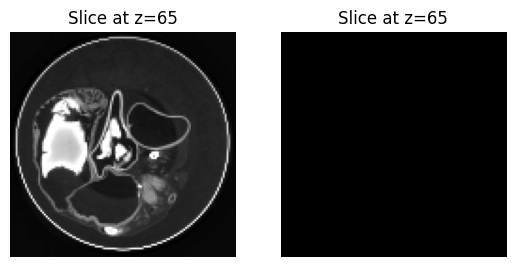
Then setup the jobs...
from rich import print as pprint

jobs = chunkwise_jobs(clip, input_array=heart_image, output_array=clipped_image)
print(f"Number of jobs: {len(jobs)}")
print("First job:")
pprint(jobs[0])
Number of jobs: 12
First job:
...run them...
executor(jobs);Reading index (slice(64, 120, None), slice(64, 120, None), slice(128, 139, None))...
Reading index (slice(64, 120, None), slice(64, 120, None), slice(128, 139, None))...
Writing index (slice(64, 120, None), slice(64, 120, None), slice(128, 139, None))...
Writing index (slice(64, 120, None), slice(64, 120, None), slice(128, 139, None))...
Reading index (slice(64, 120, None), slice(64, 120, None), slice(128, 139, None))...
Writing index (slice(64, 120, None), slice(64, 120, None), slice(128, 139, None))...
Reading index (slice(64, 120, None), slice(64, 120, None), slice(128, 139, None))...
Writing index (slice(64, 120, None), slice(64, 120, None), slice(128, 139, None))...
Reading index (slice(64, 120, None), slice(64, 120, None), slice(128, 139, None))...
Writing index (slice(64, 120, None), slice(64, 120, None), slice(128, 139, None))...
Reading index (slice(64, 120, None), slice(64, 120, None), slice(128, 139, None))...
Writing index (slice(64, 120, None), slice(64, 120, None), slice(128, 139, None))...
Reading index (slice(64, 120, None), slice(64, 120, None), slice(128, 139, None))...
Writing index (slice(64, 120, None), slice(64, 120, None), slice(128, 139, None))...
Reading index (slice(64, 120, None), slice(64, 120, None), slice(128, 139, None))...
Writing index (slice(64, 120, None), slice(64, 120, None), slice(128, 139, None))...
Reading index (slice(64, 120, None), slice(64, 120, None), slice(128, 139, None))...
Writing index (slice(64, 120, None), slice(64, 120, None), slice(128, 139, None))...
Reading index (slice(64, 120, None), slice(64, 120, None), slice(128, 139, None))...
Writing index (slice(64, 120, None), slice(64, 120, None), slice(128, 139, None))...
Reading index (slice(64, 120, None), slice(64, 120, None), slice(128, 139, None))...
Writing index (slice(64, 120, None), slice(64, 120, None), slice(128, 139, None))...
Reading index (slice(64, 120, None), slice(64, 120, None), slice(128, 139, None))...
Writing index (slice(64, 120, None), slice(64, 120, None), slice(128, 139, None))...
... and check the results:
fig, axs = plt.subplots(ncols=2)
plot_slice(heart_image, z_idx=65, ax=axs[0])
plot_slice(clipped_image, z_idx=65, ax=axs[1])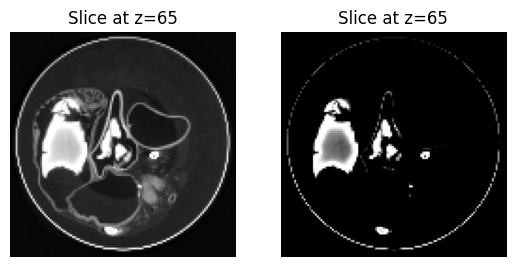
Downsampling
If we’re downsampling by a factor of two, then our output array will have half the shape of the input array. In 3D, eight input chunks will map to one output chunk.
Upsampling
If we’re upsampling by a factor of two, then our output array will have double the shape of the input array. In 3D, each input chunk will map to 8 output chunks.
Convolution
Because we are working with an image in memory, we’ve had to manually specify
backend='threading'. When working with images on disk, you shouldn’t have to specify thebackendparameter - for more info see thejoblib.Paralleldocumentation.